> ## Documentation Index
> Fetch the complete documentation index at: https://wundergraphinc-brendan-add-external-directive.mintlify.site/llms.txt
> Use this file to discover all available pages before exploring further.
# Kafka
 ## Minimum requirements
| Package | Minimum version |
| ------------ | --------------- |
| controlplane | 0.88.3 |
| router | 0.88.0 |
| wgc | 0.55.0 |
## Full schema example
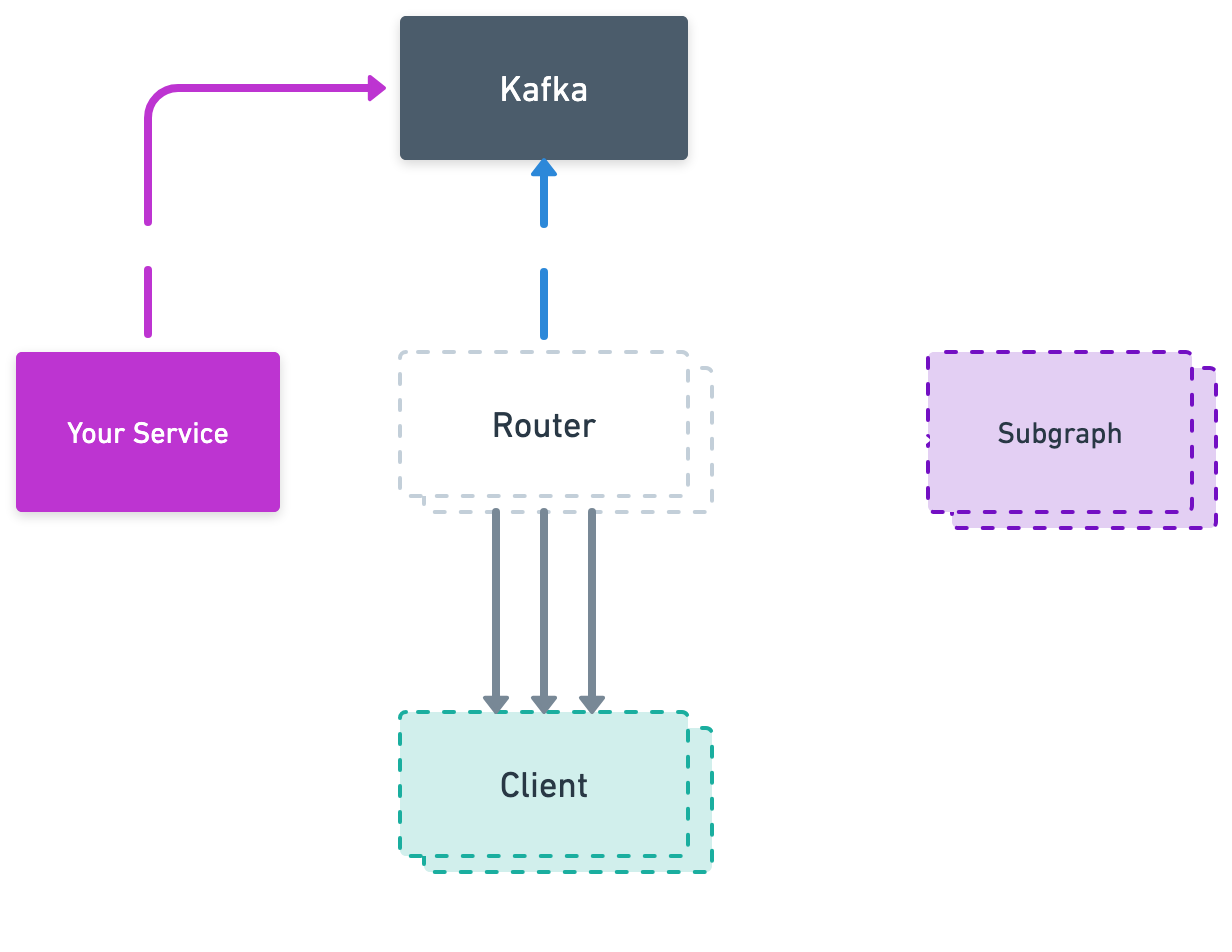
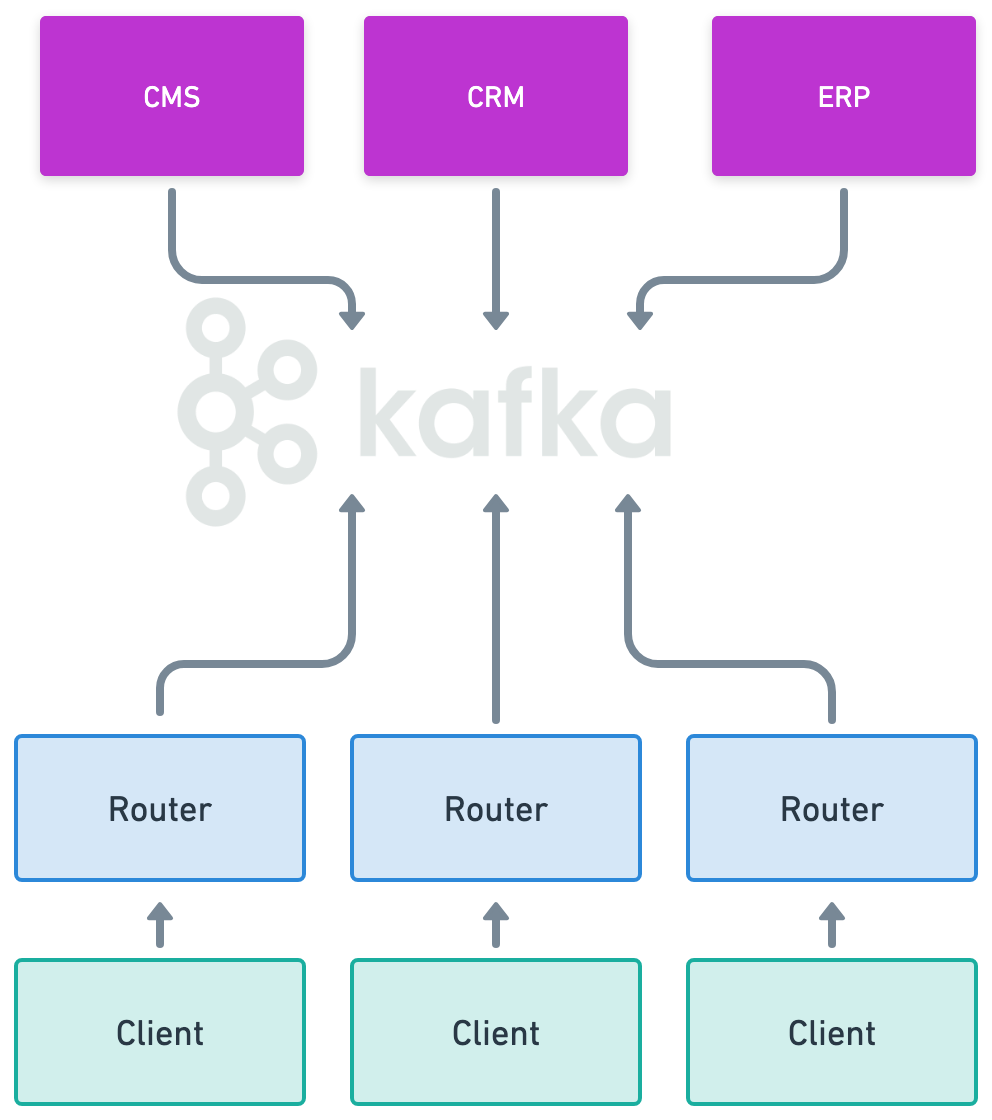
Here is a comprehensive example of how to use Kafka with EDFS. This guide covers publish, subscribe, and the filter directive. All examples can be modified to suit your specific needs. The schema directives and `edfs__*` types belong to the EDFS schema contract and must not be modified.
```js
# EDFS
directive @edfs__kafkaPublish(topic: String!, providerId: String! = "default") on FIELD_DEFINITION
directive @edfs__kafkaSubscribe(topics: [String!]!, providerId: String! = "default") on FIELD_DEFINITION
# OpenFederation
directive @openfed__subscriptionFilter(condition: openfed__SubscriptionFilterCondition!) on FIELD_DEFINITION
scalar openfed__SubscriptionFilterValue
input openfed__SubscriptionFieldCondition {
fieldPath: String!
values: [openfed__SubscriptionFilterValue]!
}
input openfed__SubscriptionFilterCondition {
AND: [openfed__SubscriptionFilterCondition!]
IN: openfed__SubscriptionFieldCondition
NOT: openfed__SubscriptionFilterCondition
OR: [openfed__SubscriptionFilterCondition!]
}
# Custom
input UpdateEmployeeInput {
name: String
email: String
}
type Mutation {
updateEmployeeMyKafka(employeeID: Int!, update: UpdateEmployeeInput!): edfs__PublishResult! @edfs__kafkaPublish(topic: "employeeUpdated", providerId: "my-kafka")
}
type Subscription {
filteredEmployeeUpdatedMyKafka(employeeID: ID!): Employee!
@edfs__kafkaSubscribe(topics: ["employeeUpdated", "employeeUpdatedTwo"], providerId: "my-kafka")
@openfed__subscriptionFilter(condition: { IN: { fieldPath: "id", values: [1, 3, 4, 7, 11] } })
filteredEmployeeUpdatedMyKafkaWithListFieldArguments(firstIds: [ID!]!, secondIds: [ID!]!): Employee!
@edfs__kafkaSubscribe(topics: ["employeeUpdated", "employeeUpdatedTwo"], providerId: "my-kafka")
filteredEmployeeUpdatedMyKafkaWithNestedListFieldArgument(input: KafkaInput!): Employee!
@edfs__kafkaSubscribe(topics: ["employeeUpdated", "employeeUpdatedTwo"], providerId: "my-kafka")
@openfed__subscriptionFilter(condition: {
OR: [
{ IN: { fieldPath: "id", values: ["{{ args.input.ids }}"] } },
{ IN: { fieldPath: "id", values: [1] } },
],
})
}
input KafkaInput {
ids: [Int!]!
}
# Subgraph schema
type Employee @key(fields: "id", resolvable: false) {
id: Int! @external
}
type edfs__PublishResult {
success: Boolean!
}
```
You can create the above Event-Driven Graph (EDG—an abstract subgraph) with the following [wgc](/cli/intro) command:
```js
wgc subgraph publish edg --namespace default --schema eedg.graphqls
```
## Router configuration
Based on the example above, you will need a compatible router configuration.
```yaml config.yaml
events:
providers:
kafka:
- id: my-kafka # Needs to match with the providerID in the directive
tls:
enabled: true
authentication:
sasl_plain:
password: "password"
username: "username"
brokers:
- "localhost:9092"
```
## Example Query
In the example query below, one or more subgraphs have been implemented alongside the Event-Driven Graph to resolve any other fields defined on `Employee`, e.g., `tag` and `details.surname`.
```js
subscription {
filteredEmployeeUpdatedMyKafka(employeeID: 1) {
id # resolved by the Event-Driven Graph (through the event)
tag # resolved by another subgraph
details { # resolved by another subgraph
surname
}
}
}
```
## System diagram
## Minimum requirements
| Package | Minimum version |
| ------------ | --------------- |
| controlplane | 0.88.3 |
| router | 0.88.0 |
| wgc | 0.55.0 |
## Full schema example
Here is a comprehensive example of how to use Kafka with EDFS. This guide covers publish, subscribe, and the filter directive. All examples can be modified to suit your specific needs. The schema directives and `edfs__*` types belong to the EDFS schema contract and must not be modified.
```js
# EDFS
directive @edfs__kafkaPublish(topic: String!, providerId: String! = "default") on FIELD_DEFINITION
directive @edfs__kafkaSubscribe(topics: [String!]!, providerId: String! = "default") on FIELD_DEFINITION
# OpenFederation
directive @openfed__subscriptionFilter(condition: openfed__SubscriptionFilterCondition!) on FIELD_DEFINITION
scalar openfed__SubscriptionFilterValue
input openfed__SubscriptionFieldCondition {
fieldPath: String!
values: [openfed__SubscriptionFilterValue]!
}
input openfed__SubscriptionFilterCondition {
AND: [openfed__SubscriptionFilterCondition!]
IN: openfed__SubscriptionFieldCondition
NOT: openfed__SubscriptionFilterCondition
OR: [openfed__SubscriptionFilterCondition!]
}
# Custom
input UpdateEmployeeInput {
name: String
email: String
}
type Mutation {
updateEmployeeMyKafka(employeeID: Int!, update: UpdateEmployeeInput!): edfs__PublishResult! @edfs__kafkaPublish(topic: "employeeUpdated", providerId: "my-kafka")
}
type Subscription {
filteredEmployeeUpdatedMyKafka(employeeID: ID!): Employee!
@edfs__kafkaSubscribe(topics: ["employeeUpdated", "employeeUpdatedTwo"], providerId: "my-kafka")
@openfed__subscriptionFilter(condition: { IN: { fieldPath: "id", values: [1, 3, 4, 7, 11] } })
filteredEmployeeUpdatedMyKafkaWithListFieldArguments(firstIds: [ID!]!, secondIds: [ID!]!): Employee!
@edfs__kafkaSubscribe(topics: ["employeeUpdated", "employeeUpdatedTwo"], providerId: "my-kafka")
filteredEmployeeUpdatedMyKafkaWithNestedListFieldArgument(input: KafkaInput!): Employee!
@edfs__kafkaSubscribe(topics: ["employeeUpdated", "employeeUpdatedTwo"], providerId: "my-kafka")
@openfed__subscriptionFilter(condition: {
OR: [
{ IN: { fieldPath: "id", values: ["{{ args.input.ids }}"] } },
{ IN: { fieldPath: "id", values: [1] } },
],
})
}
input KafkaInput {
ids: [Int!]!
}
# Subgraph schema
type Employee @key(fields: "id", resolvable: false) {
id: Int! @external
}
type edfs__PublishResult {
success: Boolean!
}
```
You can create the above Event-Driven Graph (EDG—an abstract subgraph) with the following [wgc](/cli/intro) command:
```js
wgc subgraph publish edg --namespace default --schema eedg.graphqls
```
## Router configuration
Based on the example above, you will need a compatible router configuration.
```yaml config.yaml
events:
providers:
kafka:
- id: my-kafka # Needs to match with the providerID in the directive
tls:
enabled: true
authentication:
sasl_plain:
password: "password"
username: "username"
brokers:
- "localhost:9092"
```
## Example Query
In the example query below, one or more subgraphs have been implemented alongside the Event-Driven Graph to resolve any other fields defined on `Employee`, e.g., `tag` and `details.surname`.
```js
subscription {
filteredEmployeeUpdatedMyKafka(employeeID: 1) {
id # resolved by the Event-Driven Graph (through the event)
tag # resolved by another subgraph
details { # resolved by another subgraph
surname
}
}
}
```
## System diagram