> ## Documentation Index
> Fetch the complete documentation index at: https://wundergraphinc-brendan-add-external-directive.mintlify.site/llms.txt
> Use this file to discover all available pages before exploring further.
# NATS
> NATS event provider support for EDFS
 ## Minimum requirements
| Package | Minimum version |
| ------------ | --------------- |
| controlplane | 0.88.3 |
| router | 0.88.0 |
| wgc | 0.55.0 |
## Full schema example
Here is a comprehensive example of how to use NATS with EDFS. This guide covers request, publish, subscribe directive. All examples can be modified to suit your specific needs. The schema directives and `edfs__*` types belong to the EDFS schema contract and must not be modified.
```js
# EDFS
directive @edfs__natsRequest(subject: String!, providerId: String! = "default") on FIELD_DEFINITION
directive @edfs__natsPublish(subject: String!, providerId: String! = "default") on FIELD_DEFINITION
directive @edfs__natsSubscribe(subjects: [String!]!, providerId: String! = "default", streamConfiguration: edfs__NatsStreamConfiguration) on FIELD_DEFINITION
type edfs__PublishResult {
success: Boolean!
}
input edfs__NatsStreamConfiguration {
consumerInactiveThreshold: Int! = 30
consumerName: String!
streamName: String!
}
# Custom
type Query {
employeeFromEvent(id: Int!): Employee! @edfs__natsRequest(subject: "getEmployee.{{ args.id }}", providerId: "my-nats")
employeeFromEventMyNats(employeeID: Int!): Employee! @edfs__natsRequest(subject: "getEmployeeMyNats.{{ args.employeeID }}", providerId: "my-nats")
}
input UpdateEmployeeInput {
name: String
email: String
}
type Mutation {
updateEmployeeMyNats(employeeID: Int!, update: UpdateEmployeeInput!): edfs__PublishResult! @edfs__natsPublish(subject: "employeeUpdatedMyNats.{{ args.employeeID }}", providerId: "my-nats")
}
type Subscription {
employeeUpdated(employeeID: Int!): Employee! @edfs__natsSubscribe(subjects: ["employeeUpdated.{{ args.employeeID }}"])
employeeUpdatedMyNats(id: Int!): Employee! @edfs__natsSubscribe(subjects: ["employeeUpdatedMyNats.{{ args.id }}", "employeeUpdatedMyNatsTwo.{{ args.id }}"], providerId: "my-nats")
employeeUpdatedNatsStream(id: Int!): Employee! @edfs__natsSubscribe(subjects: ["employeeUpdated.{{ args.id }}"], streamConfiguration: { consumerName: "consumerName", streamName: "streamName"}, providerId: "my-nats")
}
# Subgraph schema
type Employee @key(fields: "id", resolvable: false) {
id: Int! @external
}
```
You can create the Event-Driven Graph (EDG—an abstract subgraph) with the following [wgc](/cli/intro) command:
```js
wgc subgraph publish edg --namespace default --schema edg.graphqls
```
## Router configuration
Based on the example above, you will need a compatible router configuration.
```yaml config.yaml
events:
providers:
nats:
- id: my-nats
url: "nats://localhost:4222"
authentication:
token: "token" # or
user_info:
username: "username"
password: "password"
```
## Example Query
In the example query below, one or more subgraphs have been implemented alongside the Event-Driven Graph to resolve any other fields defined on `Employee`, e.g., `tag` and `details.surname`.
Event-Driven Graphs (EDGs) do not define resolvers, and can only define fields that compose an entity's primary key(s).
```js
subscription {
employeeUpdated(employeeID: 1) {
id # resolved by the Event-Driven Graph (through the event)
tag # resolved by another subgraph
details { # resolved by another subgraph
surname
}
}
}
```
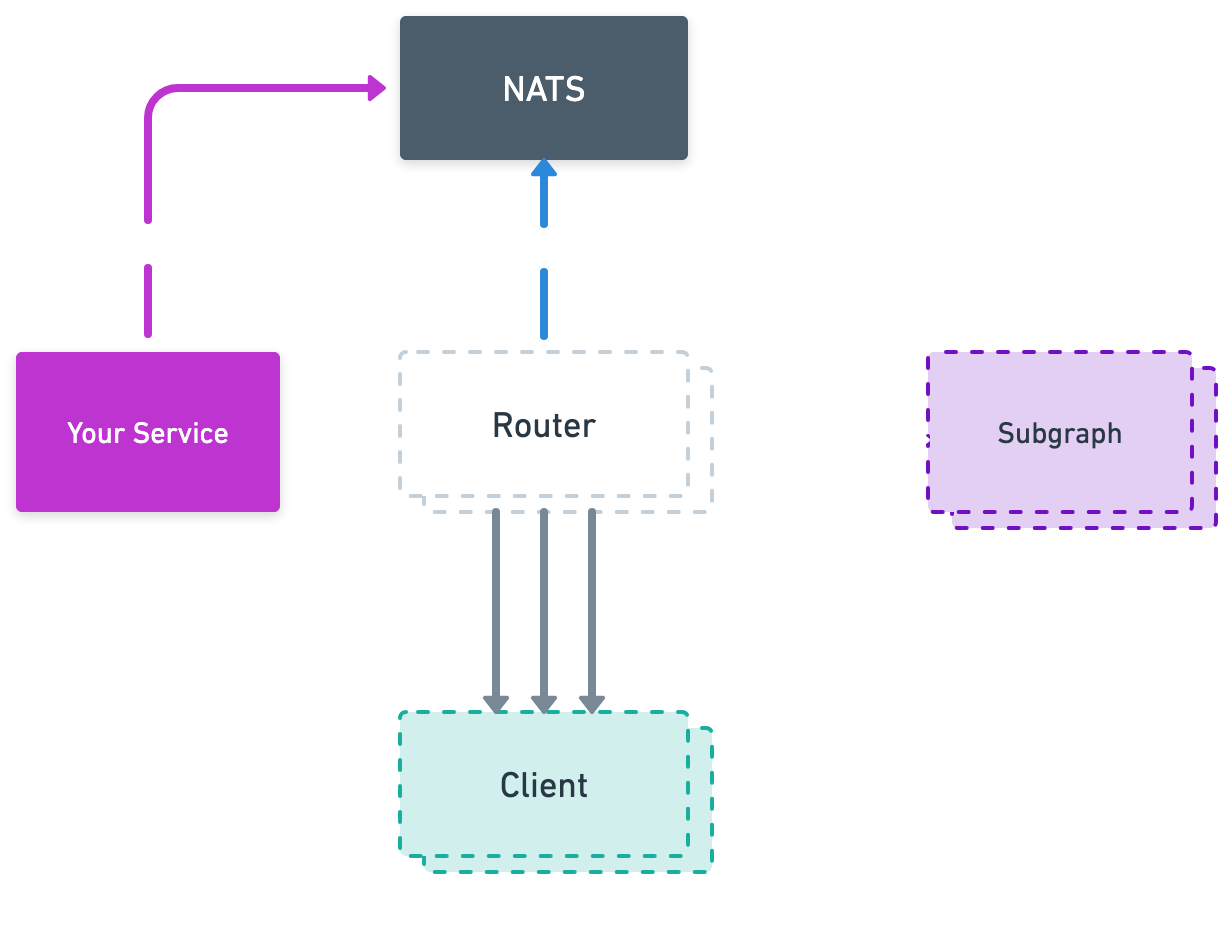
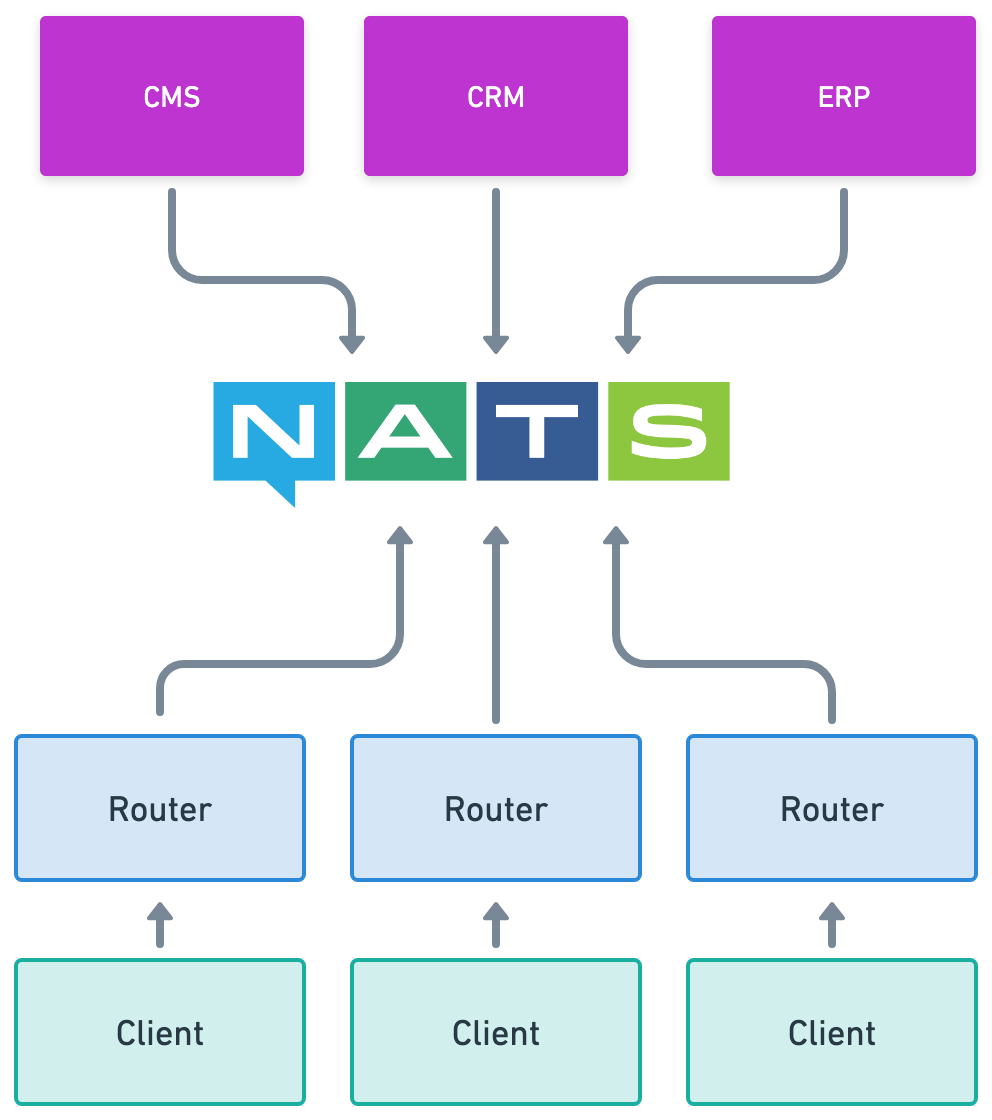
## System diagram
## Minimum requirements
| Package | Minimum version |
| ------------ | --------------- |
| controlplane | 0.88.3 |
| router | 0.88.0 |
| wgc | 0.55.0 |
## Full schema example
Here is a comprehensive example of how to use NATS with EDFS. This guide covers request, publish, subscribe directive. All examples can be modified to suit your specific needs. The schema directives and `edfs__*` types belong to the EDFS schema contract and must not be modified.
```js
# EDFS
directive @edfs__natsRequest(subject: String!, providerId: String! = "default") on FIELD_DEFINITION
directive @edfs__natsPublish(subject: String!, providerId: String! = "default") on FIELD_DEFINITION
directive @edfs__natsSubscribe(subjects: [String!]!, providerId: String! = "default", streamConfiguration: edfs__NatsStreamConfiguration) on FIELD_DEFINITION
type edfs__PublishResult {
success: Boolean!
}
input edfs__NatsStreamConfiguration {
consumerInactiveThreshold: Int! = 30
consumerName: String!
streamName: String!
}
# Custom
type Query {
employeeFromEvent(id: Int!): Employee! @edfs__natsRequest(subject: "getEmployee.{{ args.id }}", providerId: "my-nats")
employeeFromEventMyNats(employeeID: Int!): Employee! @edfs__natsRequest(subject: "getEmployeeMyNats.{{ args.employeeID }}", providerId: "my-nats")
}
input UpdateEmployeeInput {
name: String
email: String
}
type Mutation {
updateEmployeeMyNats(employeeID: Int!, update: UpdateEmployeeInput!): edfs__PublishResult! @edfs__natsPublish(subject: "employeeUpdatedMyNats.{{ args.employeeID }}", providerId: "my-nats")
}
type Subscription {
employeeUpdated(employeeID: Int!): Employee! @edfs__natsSubscribe(subjects: ["employeeUpdated.{{ args.employeeID }}"])
employeeUpdatedMyNats(id: Int!): Employee! @edfs__natsSubscribe(subjects: ["employeeUpdatedMyNats.{{ args.id }}", "employeeUpdatedMyNatsTwo.{{ args.id }}"], providerId: "my-nats")
employeeUpdatedNatsStream(id: Int!): Employee! @edfs__natsSubscribe(subjects: ["employeeUpdated.{{ args.id }}"], streamConfiguration: { consumerName: "consumerName", streamName: "streamName"}, providerId: "my-nats")
}
# Subgraph schema
type Employee @key(fields: "id", resolvable: false) {
id: Int! @external
}
```
You can create the Event-Driven Graph (EDG—an abstract subgraph) with the following [wgc](/cli/intro) command:
```js
wgc subgraph publish edg --namespace default --schema edg.graphqls
```
## Router configuration
Based on the example above, you will need a compatible router configuration.
```yaml config.yaml
events:
providers:
nats:
- id: my-nats
url: "nats://localhost:4222"
authentication:
token: "token" # or
user_info:
username: "username"
password: "password"
```
## Example Query
In the example query below, one or more subgraphs have been implemented alongside the Event-Driven Graph to resolve any other fields defined on `Employee`, e.g., `tag` and `details.surname`.
Event-Driven Graphs (EDGs) do not define resolvers, and can only define fields that compose an entity's primary key(s).
```js
subscription {
employeeUpdated(employeeID: 1) {
id # resolved by the Event-Driven Graph (through the event)
tag # resolved by another subgraph
details { # resolved by another subgraph
surname
}
}
}
```
## System diagram